New vs old tax regime: what employees see in My pay
Employees compare the new and old income-tax regimes side by side on their own salary in My pay, choose one, and declare what the old regime lets them deduct. HR verifies the declaration or returns it with a note.
Who can do thisEach employee, for themselves, in My pay. HR verifies or returns declarations (the right to edit employee records).
On this page
Before you start
- The employee's company is enrolled in TDS under Payroll › Statutory. Until it is, the tax card doesn't appear.
- In the TDS enrolment, Regime until the person chooses sets who is taxed under which regime before they pick. The law defaults to the new regime.
Steps
Step 1: Open My pay
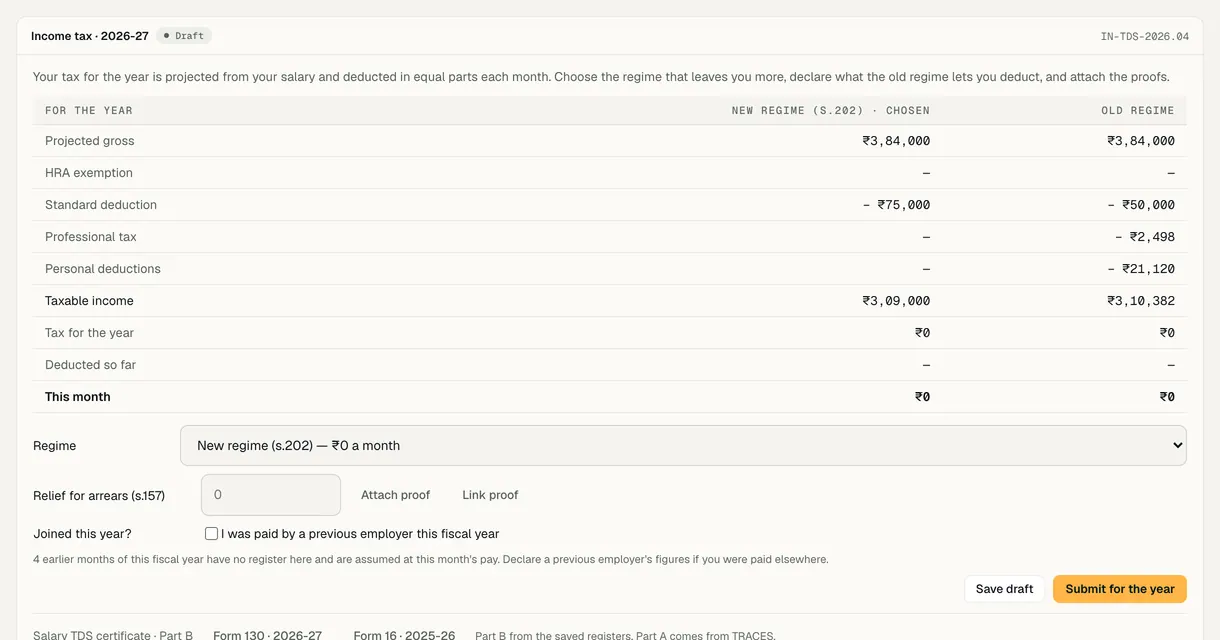
The employee opens My pay. The Income tax card for the year says how their tax is projected from their salary and deducted in equal parts each month.
Step 2: Compare the two regimes
A table puts the regimes side by side on the person's own figures: projected gross, exemptions, the standard deduction, professional tax, personal deductions, taxable income, tax for the year, what has been deducted so far and this month's deduction. The regime in use is marked chosen.
The card doesn't recommend one: the person reads both columns and decides.
Step 3: Choose a regime
In Regime, each option shows the tax it means a month. Choosing one and saving is enough for payroll to use it from the next run.
Step 4: Declare deductions and attach proofs
Under the old regime, the person enters what it lets them deduct, such as rent paid a month for HRA, investments and health insurance, and uses Attach proof or Link proof for each. A person who joined this year can add what a previous employer paid them.
Save draft keeps it to finish later; Submit for the year sends it to HR.
Step 5: HR verifies or returns it
HR opens the person's profile, Compensation tab, reads the declaration and its proofs, and chooses Verify, or Return with a note saying what needs changing.
A returned declaration's deductions are left out of the tax until the person resubmits. Once verified, the person can't change it themselves.

Demo workspace · fictional clinic group
What to check
- The card's status reads Draft, Submitted · awaiting verification, Verified or Returned — see the note.
- This month's deduction on the card matches the TDS line on the next payslip.
- The tax rule's version shows on the card; the rule versions below say whether it is still marked for review.
Rule versions
This guide follows the India rules in force today, read from the same rule pack payroll uses (pack IN-2026.10.3). Each pay run records the version it used.
| Scheme | Rule version | Effective from | Last checked | Status |
|---|---|---|---|---|
| Income tax deducted at source | IN-TDS-2026.04Income-tax Act, 2025 (Act 30 of 2025) s.392, s.202, s.19, s.124, s.156; Finance Act 2026 (Act 4 of 2026) First Schedule Part III and s.3 — figures unchanged from 2025-26 (Finance Bill 2026 memorandum); Income-tax Rules, 2026 (G.S.R. 198(E), 20-03-2026) rr.205, 215, 219, 279 — Forms 124/130/138 and eight HRA metros. Rules read from a gazette facsimile; re-check against incometaxindia.gov.in. See output/audits/tds-2026-27/RESEARCH.md. | 01 Apr 2026 | 16 Oct 2026 | Review pending |
Last reviewed
Try it on the demo workspace
We walk you through it on a workspace with fictional people, then set up yours with you.
Book a demo