Build a weighted screening rubric and read the match score
Weight what matters for a role, then read the suggested overall match from 0 to 100 that GrowthPPL gives each applicant against those weights, with a short summary. A person decides; nobody is rejected automatically.
Who can do thisOwners and HR set the rubric (it needs the right to edit jobs). Anyone who can edit candidates can ask for a fresh score.
On this page
Before you start
- Scoring needs an AI provider: ours, where each score uses one AI credit, or your workspace's own key, where it uses none. Without one, nothing is scored and the screen says so.
- A rubric weighs four criteria: skills match, experience depth, communication, and motivation and fit. You set how much each one counts.
Steps
Step 1: Set the weights when you create the role
In New job, the fourth step is Rubric. Drag each criterion's weight to match what matters for this role. The weights must total 100: the step shows the total, and Balance to 100 rescales them for you. Continue → stays off until they do.
Step 2: Change the weights later
Select the role in Hiring, open Interviews, then the Templates & rubrics tab, and choose Draft rubric with AI. It opens the selected role's weights as sliders. Adjust them until they total 100, then choose Save rubric →.
The role's Job setup tab shows its Scoring rubric: each criterion and its weight.

Step 3: Read an applicant's match score
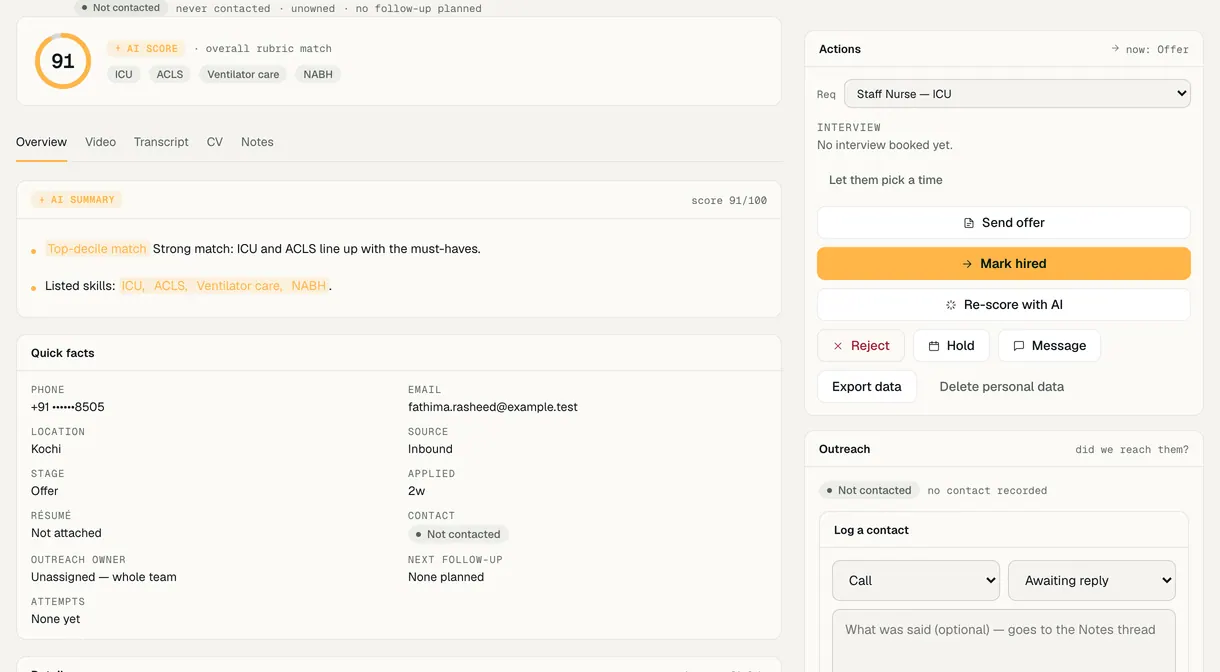
Open the applicant. The top of their page shows the AI score as an overall rubric match from 0 to 100, and the AI summary card adds a one-sentence summary of why. It is one overall figure for a person to read, not a decision.
If they haven't been scored yet, the page says not scored yet. Choose Re-score with AI to score them against the rubric now.
Step 4: Decide what moves to Shortlisted
Each role has a switch in Edit role that moves a strong match from Applied to Shortlisted on its own. It is on for a new role. While it is on, applicants are scored as they apply; a strong match moves to Shortlisted and everyone else stays in Applied for a person to read.
Nobody is rejected automatically, and anyone a person has already moved is left alone. With the switch off, every applicant waits in Applied for a person to shortlist.


Demo workspace · fictional clinic group
What to check
- The role's Job setup tab shows the weights you saved, totalling 100.
- A scored applicant shows an overall figure from 0 to 100 and a summary; a person still moves them on or turns them down.
- If the score says the provider isn't set up or credits have run out, nobody was scored and nothing was billed for that attempt.
Last reviewed
Try it on the demo workspace
We walk you through it on a workspace with fictional people, then set up yours with you.
Book a demo