Generate and upload your PF ECR, ESI and PT returns
Build each month's PF ECR, ESI contribution file and professional tax returns from a paid run, check who is missing an identifier, and upload the files to the government portals yourself. GrowthPPL never files for you.
Who can do thisAnyone with the right to run or read payroll can check and download the files. Recording a challan needs the right to run payroll.
On this page
Before you start
- The run is paid: record its payment on Pay runs first. A return reports money that went, so it is built from a paid run only.
- The schemes are enrolled under Payroll › Statutory; a button appears only for a scheme you are enrolled in.
Steps
Step 1: Open Taxes & filings
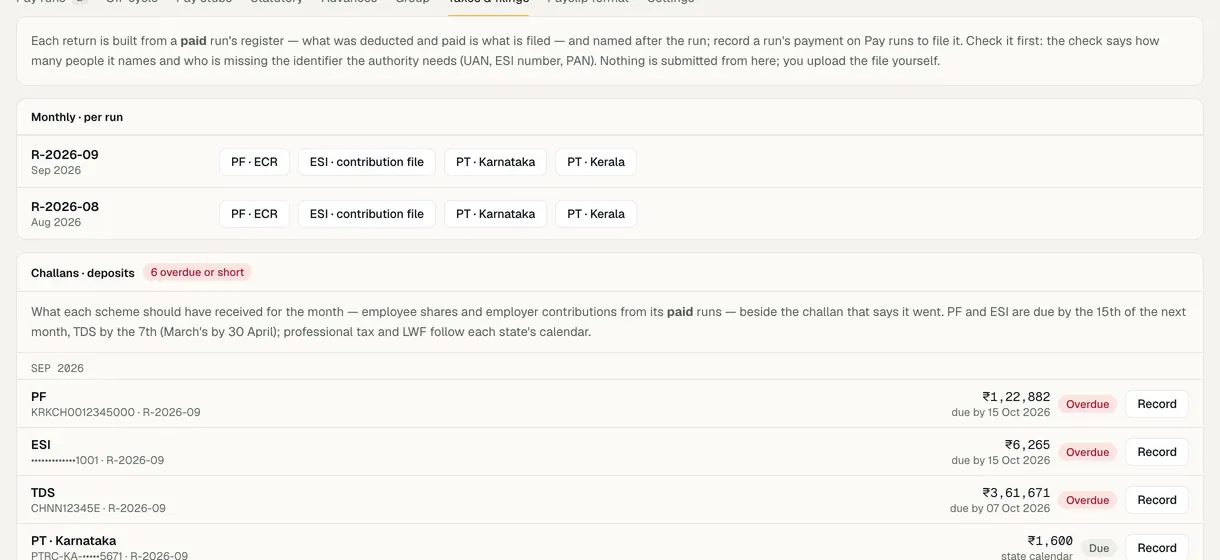
Go to Payroll and open the Taxes & filings tab. Under Monthly · per run, each run has its buttons: PF · ECR, ESI · contribution file and PT for each state. A run that isn't paid yet says its returns open once the payment is recorded.
Step 2: Check the file before you download it
Choosing a button checks the file first: it says how many people it names and who is missing the identifier the authority needs, under Before you upload:. A missing UAN leaves that ECR line blank and EPFO will reject it; a missing ESI insurance number leaves the IP number blank.
Add the missing numbers on each person's profile, under Compensation › Statutory, and check again. When every person has what the file needs, it says so.
Step 3: Download and upload it yourself
Choose Download. The ECR is a text file in the portal's format; the ESI and PT returns are CSV files, one PT file for each state. Upload each one on the authority's own portal: nothing is submitted from GrowthPPL.
Step 4: Record each deposit
On the same tab, Challans · deposits lists what each paid run owes PF, ESI, PT and TDS, marked Due, Overdue, Short or Deposited. Choose Record, enter the amount, the day it was deposited and the TRRN or challan number, then Save challan.
Step 5: Build the quarterly and yearly TDS sheets
Under Quarterly and yearly · TDS, the quarterly button builds the Form 138 annexure (24Q before 2026-27) as a working sheet, and the yearly buttons give the Form 130 Part B figures (Form 16 before 2026-27). Part A of the certificate comes from TRACES.

Demo workspace · fictional clinic group
What to check
- Each file's check names the number of people you expect, with nobody missing an identifier.
- Every scheme a run owes shows Deposited once you record its challan.
- Each download is kept in the audit log with who took it.
Rule versions
This guide follows the India rules in force today, read from the same rule pack payroll uses (pack IN-2026.10.3). Each pay run records the version it used.
| Scheme | Rule version | Effective from | Last checked | Status |
|---|---|---|---|---|
| Employees' Provident Fund | IN-PF-2026.09Code on Social Security 2020 s.2(89): wage ceiling ₹25,000 a month for Chapter III (EPF, EPS, EDLI) by Notification S.O. 5109(E) of 17 Sep 2026, Ministry of Labour and Employment, F. No. R-12025/01/2026-SS-II (Gazette of India Extraordinary No. 4918), superseding S.O. 2702(E) of 29 May 2026. EPS 8.33% and EDLI 0.5% on wages up to ₹25,000 and rates unchanged per the EPFO FAQ (secondary quotes). Priced by the period's last day, so all of September 2026 is on ₹25,000 — the FAQ splits the month at the 17th. | 17 Sep 2026 | 12 Oct 2026 | Source checked |
| Employees' State Insurance | IN-ESI-2019.07ESI (Central) Amendment Rules 2019, G.S.R. 423(E); wage limit Rule 50 as amended 2016 (w.e.f. 1 Jan 2017) | 01 Jul 2019 | 06 Sep 2026 | Source checked |
- Professional tax: a rule for each of 22 states, last checked 12 Oct 2026. Review pending 16 are marked for review.
Last reviewed
Try it on the demo workspace
We walk you through it on a workspace with fictional people, then set up yours with you.
Book a demo