Set up CTC structures and gratuity inside CTC
Decide how a CTC is split into Basic, allowances and the employer's own contributions, switch base pay to CTC with a preview of everyone, and set gratuity aside inside the CTC if you want to.
Who can do thisSomeone with compensation or payroll rights changes the structure, switches base pay and sets gratuity. Entering one person's CTC needs the right to edit employee records.
On this page
Before you start
- One structure applies to the whole workspace; each person's CTC is split by it.
- Know the salary parts you pay (Basic, HRA, allowances) and which one should take whatever is left.
- Pick the month the change should start. Past payslips and saved registers never change.
Steps
Step 1: Open the salary structure
Go to Compensation and open the Salary structure tab. The Base pay is card shows whether your workspace reads base pay as CTC or Gross.
Step 2: Build how a CTC is split
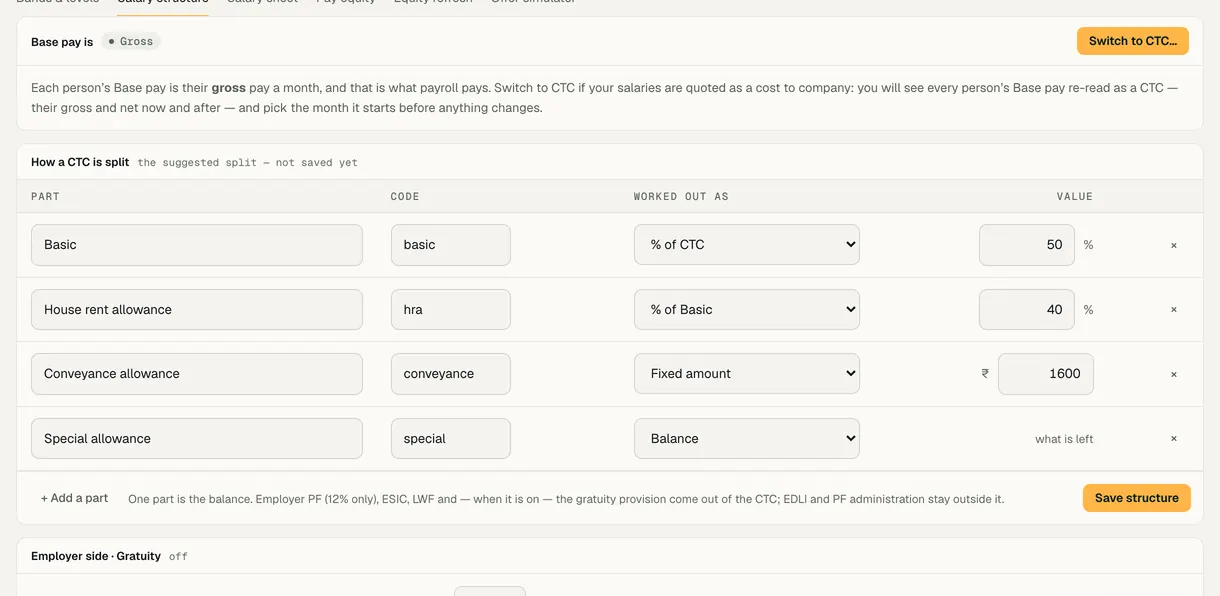
In How a CTC is split, each part has a Worked out as rule: % of CTC, % of Basic, Fixed amount or Balance. Exactly one part is the balance: it takes whatever the CTC leaves after the other parts and the employer's contributions. Use + Add a part for more, then Save structure.
The employer's own PF, ESIC and LWF, and the gratuity provision when it is on, come out of the CTC; EDLI and PF administration charges stay outside it. Saving moves nobody's pay: in a CTC workspace you apply it with Recalculate structures…, with a preview.
Step 3: Try a CTC before you commit
Open See calculations · Try a CTC, type a monthly CTC and read the split: each part, the gross, the employer's contributions and the net.
Step 4: Switch base pay to CTC
Choose Switch to CTC…, pick the month it Starts, then Preview everyone. The preview lists each person's CTC with their gross, net, special allowance and gratuity now and after.
Choose Confirm — read Base pay as CTC. Payroll pays the gross; each person's CTC is kept on their dated salary record. Switch back to Gross… works the same way.
Step 5: Set gratuity aside inside the CTC
In Employer side · Gratuity, tick Set gratuity aside inside the CTC and set the rate as a percentage of Basic + DA. It starts at 4.81% of Basic + DA, which is 15/26 of a month's Basic + DA a year spread over twelve months; you can set it above 0 and up to 20, with at most two decimals.
Choose Preview the change… and confirm. Gratuity comes out of the CTC like employer PF, so Special allowance shrinks by it; it is not part of the gross and is never paid monthly. The exit payout is worked out by the law's formula, not from what was set aside.
Step 6: Give each person their CTC
On a person's profile, enter CTC (monthly) and the day it starts, then Save. For many people at once, use the bulk salary sheet.

Demo workspace · fictional clinic group
What to check
- The person's CTC breakdown · as paid this month adds up to their CTC: gross plus the employer's contributions and, when on, the gratuity provision.
- With gratuity on, the payslip shows Gratuity (set aside) and it is not counted in the gross.
- Changing the structure later moves nobody until you recalculate; past payslips stay as they were.
Rule versions
This guide follows the India rules in force today, read from the same rule pack payroll uses (pack IN-2026.10.3). Each pay run records the version it used.
| Scheme | Rule version | Effective from | Last checked | Status |
|---|---|---|---|---|
| Employees' Provident Fund | IN-PF-2026.09Code on Social Security 2020 s.2(89): wage ceiling ₹25,000 a month for Chapter III (EPF, EPS, EDLI) by Notification S.O. 5109(E) of 17 Sep 2026, Ministry of Labour and Employment, F. No. R-12025/01/2026-SS-II (Gazette of India Extraordinary No. 4918), superseding S.O. 2702(E) of 29 May 2026. EPS 8.33% and EDLI 0.5% on wages up to ₹25,000 and rates unchanged per the EPFO FAQ (secondary quotes). Priced by the period's last day, so all of September 2026 is on ₹25,000 — the FAQ splits the month at the 17th. | 17 Sep 2026 | 12 Oct 2026 | Source checked |
| Employees' State Insurance | IN-ESI-2019.07ESI (Central) Amendment Rules 2019, G.S.R. 423(E); wage limit Rule 50 as amended 2016 (w.e.f. 1 Jan 2017) | 01 Jul 2019 | 06 Sep 2026 | Source checked |
- Labour welfare fund: a rule for each of 16 states, last checked 12 Oct 2026. Review pending 6 are marked for review.
Last reviewed
Try it on the demo workspace
We walk you through it on a workspace with fictional people, then set up yours with you.
Book a demo